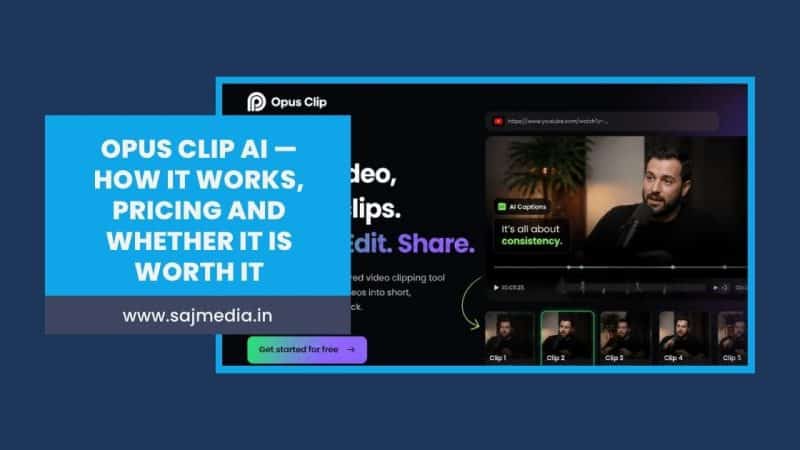
Opus Clip AI does one thing that used to take creators hours — and now takes minutes.
Most creators sitting on hours of long-form video are leaving their best content unused. A 60-minute podcast interview might contain 15 shareable moments worth posting to TikTok, Reels, and YouTube Shorts. Finding those moments manually, cutting them, adding captions, and reformatting for vertical video used to eat an entire editing day. Opus Clip AI automates that entire process from a single upload.
This guide covers exactly how Opus Clip AI works, what it costs, where it falls short, and which alternatives make more sense depending on your workflow.
What Is Opus Clip AI
Opus Clip AI is an AI-powered video repurposing platform that automatically converts long-form video into short, captioned clips optimized for TikTok, YouTube Shorts, and Instagram Reels. Upload a video up to several hours long and Opus Clip AI identifies the most engaging moments, cuts them into clips, adds animated captions, reframes for vertical format, and scores each clip by viral potential.
The platform serves over 10 million creators and 1 million businesses since launching in 2022. It is the most widely recognized AI clipping tool in the market — and for most creators producing talking-head, podcast, or interview content, it consistently delivers usable clips within 2 to 5 minutes of upload.
What separates Opus Clip AI from general AI video generators is its specific focus. It does not create video from scratch — it repurposes existing footage. This distinction matters because the AI is trained specifically to identify engaging spoken moments rather than generate new content.
How Opus Clip AI Works
Opus Clip AI uses three core AI systems working simultaneously on every upload.
AI Clip Detection identifies the highest-value moments in your video based on engagement signals — strong hooks, quotable statements, topic shifts, emotional peaks, and moments likely to drive watch-through on short-form platforms.
Active Speaker Detection automatically tracks and reframes the speaker as they move, keeping them centered in the vertical frame throughout each clip. This is what makes podcast and interview content work in 9:16 format without manual cropping.
AI Virality Score rates each generated clip on a scale of 0 to 100 based on hook strength, engagement potential, and structural fit for short-form platforms. Instead of reviewing every clip manually, the score surfaces the strongest options immediately.
The practical workflow takes under 5 minutes. Upload your video or paste a YouTube URL. Opus Clip AI processes the footage and returns 5 to 15 clips ranked by virality score. You review the top-rated clips, make any edits in the built-in editor, add captions and branding, then publish directly to TikTok, YouTube Shorts, and Instagram Reels from the platform.
Opus Clip AI Pricing — Full Breakdown
Opus Clip AI uses a credit-based model where each minute of source video processed costs one credit. A 60-minute podcast episode costs 60 credits regardless of how many clips are generated from it.
| Plan | Monthly Price | Credits | Key Features |
|---|---|---|---|
| Free | $0 | 60 min/month | Watermarked clips, 1080p, files expire in 3 days |
| Starter | $15/month | 150 min/month | No watermark, virality score, 1 brand template, manual download |
| Pro | $29/month | 300 min/month | AI B-roll, auto-publish, scheduler, team workspace, all aspect ratios |
| Business | Custom | Custom | API access, dedicated support, enterprise security |
Annual billing saves approximately 17% — Pro drops to $24 per month on annual plans.
Important pricing notes:
The free tier is genuinely useful for testing but impractical for production. The 3-day file expiry means clips must be downloaded immediately or they are lost. The watermark prevents professional use.
The Starter plan at $15 per month is where Opus Clip AI becomes usable — but it still lacks auto-publishing and AI B-roll. Most serious creators land on Pro at $29 per month.
At Pro pricing, 300 minutes per month covers approximately 10 hour-long podcasts or 20 shorter videos. High-volume creators or agencies processing daily content will hit this ceiling quickly, making the Business tier necessary.
Opus Clip AI Features — What Actually Works
AI Captions generate automatically in over 20 languages with animated word-by-word styling. Caption accuracy on clear audio is consistently high — comparable to dedicated transcription tools. Background noise and overlapping speakers reduce accuracy noticeably.
Virality Score is the feature most creators find immediately useful. Rather than reviewing 15 clips to find the 3 worth posting, the score directs attention to the strongest clips first. Independent testing reports 80% or more usable clip rates from podcast and interview content specifically.
Agent Opus — available on Growth and Scale plans — takes automation further by handling end-to-end short-form creation without manual review. It selects clips, adds captions, applies branding, and schedules publication automatically. For agencies managing multiple creator channels, this removes the human bottleneck from the repurposing workflow entirely.
Multi-platform publishing on Pro and above allows direct posting to TikTok, YouTube Shorts, Instagram Reels, LinkedIn, and X from the Opus Clip interface. This eliminates the manual download-and-upload cycle across five separate apps.
AI B-roll insertion automatically adds contextually relevant B-roll clips to support spoken content. Results are inconsistent — the B-roll selection works well for general topics and poorly for niche or technical subjects where the AI does not have relevant reference material.
Where Opus Clip AI Falls Short
Per-minute credit system gets expensive fast. A 60-minute podcast consumes 20% of a Pro plan’s monthly allocation in a single upload. Creators producing multiple long-form videos weekly will either need Business tier pricing or find the credit system genuinely limiting.
40% miss rate on clip selection. Independent testing consistently finds that approximately 40% of AI-selected clips miss the mark — either cutting off mid-thought, selecting low-energy moments, or misidentifying the strongest hooks. Manual review remains necessary before publishing.
Processing failures at peak times. Multiple 2026 user reviews report processing hangs and failures during peak usage periods. This is a recurring complaint across review platforms and a genuine operational risk for creators on tight publishing schedules.
Limited editing capability below Pro. The Starter plan lacks the clip editor, meaning any trim adjustments require a separate tool. Pro unlocks the full editor, but this creates a significant feature gap between the two paid tiers.
Not designed for B-roll heavy content. Opus Clip AI works best with talking-head and interview footage where the speaker is the primary subject. Documentary-style content, tutorial videos with frequent screen cuts, and heavily edited productions produce significantly lower quality output.
Opus Clip AI Alternatives — When to Use Something Else
Descript — Best for Full Video Editing
Descript approaches video editing from a completely different direction — edit video by editing the transcript. Delete a word from the transcript and the corresponding video clip disappears. This text-based approach makes it significantly faster for creators who spend most of their editing time cutting and rearranging spoken content.
Descript includes AI clip suggestions but they are secondary to its core transcript-editing workflow. For creators who want control over the final edit rather than AI-selected moments, Descript is the stronger tool. Starting at $24 per month.
Choose Descript when: You want to edit the full video, not just extract clips. Your content involves heavy editing beyond simple clip selection.
Munch — Best for Marketing Teams
Munch focuses specifically on identifying marketing-relevant moments in video — product mentions, testimonials, key messages — rather than general engagement signals. It integrates directly with marketing analytics to prioritize clips based on trending topics and brand keywords.
Choose Munch when: You are repurposing brand content or client videos where specific marketing messages need to be highlighted rather than general engagement moments.
Vidyo.ai — Best Budget Alternative
Vidyo.ai offers similar AI clipping functionality at a lower price point — plans start at approximately $16 per month with no per-minute credit system. The output quality is slightly below Opus Clip AI on complex content but competitive for straightforward talking-head videos.
Choose Vidyo.ai when: Cost is the primary concern and your content is straightforward interview or talking-head format.
CapCut — Best Free Option
CapCut’s AI features now include basic clip extraction and auto-captions at no cost. The AI clip selection is less sophisticated than Opus Clip AI but produces usable results for creators who need occasional repurposing rather than a systematic weekly workflow.
Choose CapCut when: You repurpose video occasionally rather than weekly, and the free tier is the priority.
Opus Clip AI vs Descript — Quick Comparison
| Feature | Opus Clip AI | Descript |
|---|---|---|
| Primary use | AI clip extraction from long video | Full transcript-based video editing |
| AI clip detection | Core feature, best-in-class | Basic clip suggestions |
| Text-based editing | No | Yes — edit video by editing transcript |
| Auto captions | Yes, 20+ languages | Yes, high accuracy |
| Multi-platform publish | Yes, Pro and above | Limited — export then upload |
| Screen recording | No | Yes |
| Pricing | From $15/month | From $24/month |
| Best for | Repurposing existing long-form content | Creating and editing from scratch |
Who Should Use Opus Clip AI
Opus Clip AI is the right tool if:
- You produce long-form video weekly — podcasts, interviews, YouTube videos, webinars
- Your primary goal is getting more platform coverage from existing footage without additional filming
- You are a solo creator who cannot afford a dedicated video editor
- You post to three or more short-form platforms and the manual reformatting process is your biggest bottleneck
Opus Clip AI is not the right tool if:
- You produce B-roll heavy or heavily edited content
- You need to edit the full video rather than extract clips
- Your content is highly technical or niche where AI clip selection consistently misses context
- You are on a tight budget and process more than 5 to 10 long videos per month
For creators building a full AI content creation workflow, Opus Clip AI pairs naturally with AI writing tools for scripts and captions and Claude AI for content planning and repurposing strategies. The combination reduces total content production time significantly while maintaining the human creative direction that makes content worth watching.
Is Opus Clip AI Worth It
For creators producing long-form content weekly, yes — Pro at $29 per month delivers clear return on time saved. The 2 to 5 minute clip generation workflow replaces what previously took hours of manual editing. At Pro pricing, the tool pays for itself if it saves even two hours of editing time per month.
For creators who produce video occasionally or whose content is primarily B-roll and heavily edited footage, the value proposition is weaker. The per-minute credit system becomes expensive relative to output for low-volume users, and the AI clip selection underperforms on non-talking-head content.
The honest assessment from multiple independent testers: Opus Clip is not the cheapest AI clipping tool on the market, nor is it the most feature-rich. But it is the most recognized and polished, and for millions of creators, that reliability and brand trust matter more than marginal cost savings. ssemble
Start with the free tier. Process one of your existing long-form videos. If the virality score surfaces clips you would have selected manually, the paid tier is worth it. If the AI consistently misses what you consider the strongest moments, a different tool will serve you better.
FAQ
Opus Clip AI takes long-form video — podcasts, interviews, YouTube videos, webinars — and automatically extracts the most engaging moments as short clips ready for TikTok, YouTube Shorts, and Instagram Reels. It adds animated captions, reframes for vertical format, and scores each clip by viral potential.
Opus Clip AI offers a free tier with 60 processing minutes per month and watermarked output. The Starter plan costs $15 per month for 150 minutes with no watermark. Pro costs $29 per month for 300 minutes with full features including auto-publishing, AI B-roll, and team workspace. Annual billing saves approximately 17%.
Yes — there is a permanent free tier with 60 processing minutes per month. Free clips include a watermark and expire after 3 days, making the free plan suitable for testing rather than production use.
The Virality Score rates each generated clip from 0 to 100 based on hook strength, engagement potential, and structural fit for short-form platforms. It helps creators identify the strongest clips without manually reviewing every output.
The best alternatives depend on your needs. Descript is stronger for full video editing and transcript-based workflows. Munch is better for marketing teams focused on brand messaging. Vidyo.ai offers lower pricing for budget-conscious creators. CapCut provides free basic clipping for occasional use.
Opus Clip AI works best with talking-head content — podcasts, interviews, webinars, and YouTube videos where one or two speakers are the primary subjects. It performs significantly worse on B-roll heavy content, heavily edited productions, and technical tutorial videos where context is difficult for the AI to interpret.
Conclusion
Opus Clip AI solves a genuine problem for long-form creators — the time cost of repurposing content for short-form platforms is real, and the tool addresses it effectively for the right content type.
If you produce weekly long-form talking-head content and currently spend hours manually cutting clips for Reels, Shorts, and TikTok, the Pro plan at $29 per month is a straightforward investment. Start with the free tier, process one existing video, and let the results tell you whether the AI clip selection matches your editorial judgment.
For creators building a broader social media content strategy, content repurposing is one of the highest-leverage activities available — turning one hour of filming into a week of short-form content across five platforms. Opus Clip AI makes that workflow achievable without a dedicated editing team.





Leave a Comment
Your email address will not be published. Required fields are marked *