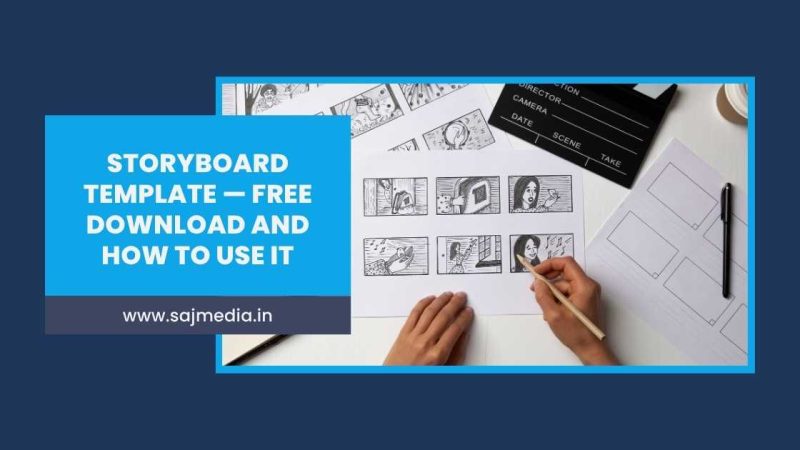
A storyboard template is the tool that separates creators who film efficiently from those who spend hours reshooting the same scene.
Every professional film set, YouTube channel, and brand video campaign starts with a storyboard. It maps your shots before you pick up a camera. It saves time on set, reduces costly mistakes, and gives everyone on your team a shared visual reference.
This guide explains what a storyboard is, how to use one, and gives you a free storyboard template to download and use immediately.
What Is a Storyboard
A storyboard is a sequence of drawn panels that maps out your video shot by shot before filming begins. Each panel represents one camera shot. Together they tell the complete visual story of your video from start to finish.
Think of it as a visual script. Your written script tells you what happens. Your storyboard tells you exactly how it looks on screen — camera angle, framing, subject position, and movement.
Professional filmmakers, advertising agencies, and YouTube creators all use storyboards. The format works equally well for a 30-second product ad or a full short film.
Free Storyboard Template — Download Now
The SAJ Media storyboard template is a clean, professional two-page PDF. It gives you 12 panels with fields for every detail you need to plan your shoot.
Each panel includes space for:
- Scene and action description
- Camera angle
- Dialogue
- Duration
- Notes
Download Free Storyboard Template — PDF
Print it out, sketch your shots, and arrive on set fully prepared. No signup required.
Why Every Video Creator Needs a Storyboard
Most beginner creators skip storyboarding. They arrive on set with a rough idea and figure it out as they go. This approach wastes time, misses shots, and often results in footage that does not cut together properly in the edit.
A storyboard solves all of these problems before they happen. Here is what it does for your production:
Saves time on set — When every shot is planned, filming becomes execution rather than improvisation. You arrive knowing exactly what you need.
Prevents missing shots — It is easy to forget a cutaway or transition shot in the moment. Your storyboard is a checklist that ensures you capture everything the edit needs.
Communicates your vision — If you are working with a team, a storyboard gives everyone a shared reference. Your camera operator, lighting assistant, and talent all understand what the shot looks like before you call action.
Speeds up editing — Footage that was planned against a storyboard is easier to edit. You know which shots go where because you decided that before filming began.
As covered in the guide to how to write a video script, the best productions plan thoroughly before they produce. Storyboarding is the visual equivalent of scripting — it is the step that makes everything downstream faster and cleaner.
How to Use the Storyboard Template
Step 1 — Fill In the Project Details
At the top of each page, fill in the project title, director name, scene number, and date. These details keep your storyboard organized, especially when a project has multiple scenes or multiple people involved.
Step 2 — Sketch Each Shot Panel
In the large drawing area of each panel, sketch the frame for that shot. You do not need to be a skilled artist. Simple stick figures and basic shapes work perfectly. The goal is to communicate framing and composition, not to create finished artwork.
Draw what the camera sees. Show where the subject is positioned, what is in the background, and how much of the frame the subject occupies.
Step 3 — Fill In the Shot Details
Under each panel, complete the five fields:
Scene / Action — Describe what is happening in this shot. Keep it brief and specific.
Camera Angle — Note the shot type and angle. For example: close-up, wide shot, low angle, over the shoulder. The guide to types of shots in film covers every shot type you might need.
Dialogue — Write any spoken lines that occur during this shot. If there is no dialogue, leave it blank.
Duration — Estimate how long this shot will run in the final edit. Even a rough estimate helps you plan your total runtime.
Notes — Add anything else relevant — lighting notes, props needed, specific lens, or camera movement. The guide to camera movement techniques is useful here if you are planning pans, tilts, or tracking shots.
Step 4 — Number Your Shots
Each panel is numbered automatically in the template from Shot 01 to Shot 12 across both pages. If your project needs more than 12 shots, simply print additional copies and continue the numbering manually.
Step 5 — Review Before Filming
Once your storyboard is complete, review it from start to finish as if watching the video. Ask yourself whether the sequence makes sense, whether any shots are missing, and whether transitions between shots work visually.
Make changes at this stage, not on set. Revising a sketch takes seconds. Reshooting a scene takes hours.
Storyboard Tips for Video Creators
One panel, one shot — Each panel represents a single camera setup. If the camera moves significantly or the subject changes position, that is a new panel.
Include arrows for movement — Use arrows inside the drawing area to indicate camera movement or subject movement within the frame. A simple curved arrow communicates a pan. A straight arrow indicates a subject walking through frame.
Do not overthink the drawings — The most common reason creators skip storyboarding is feeling their drawings are not good enough. They do not need to be. A circle for a head and a rectangle for a body is sufficient to communicate framing.
Use your storyboard as a shot list on set — Print your completed storyboard and tick off each panel as you film it. This keeps you on track and ensures nothing is missed.
Plan your B-roll separately — Your main storyboard covers your primary shots. Consider a separate list for B-roll footage — cutaways, location shots, product close-ups — that will support the main footage in the edit.
Using AI video generators alongside a storyboard is an increasingly popular workflow. Creators use the storyboard to plan their visual sequence, then generate AI B-roll clips that match each panel exactly.
Storyboard vs Shot List — What Is the Difference
A shot list and a storyboard serve similar purposes but in different formats.
A shot list is a written document — typically a spreadsheet — that lists every shot by number with notes on camera setup, lens, and action. It is fast to create and easy to update on set.
A storyboard is a visual document that shows what each shot looks like. It communicates framing, composition, and visual flow in a way that a written list cannot.
Most professional productions use both. The storyboard communicates the creative vision. The shot list manages the logistics of capturing it.
For solo creators and small teams, the storyboard template covers most of what a shot list provides anyway — each panel includes all the technical details alongside the visual sketch.
FAQ
A storyboard template is used to plan a video production shot by shot before filming begins. Each panel represents one camera shot with space for sketching the frame and noting scene details, camera angle, dialogue, and duration.
No. Storyboards use simple sketches to communicate framing, not finished artwork. Stick figures and basic shapes are entirely sufficient. The goal is to show where subjects are positioned within the frame.
It depends on the length and complexity of your video. A 60-second social media video might need 8 to 15 panels. A short film scene might need 20 to 30. Print multiple copies of the template if your project needs more than 12 panels.
Can I use a storyboard for Instagram Reels and short-form video?
Yes. Storyboarding is especially useful for short-form content because every second counts. Planning your Reels shot by shot ensures your hook, value delivery, and call to action all land within the time limit.
A storyboard is a visual document showing what each shot looks like. A shot list is a written document listing technical details for each shot. Professional productions typically use both. For most independent creators, a storyboard template covers both functions adequately.
Yes. The SAJ Media storyboard template is completely free to download, print, and use for any personal or commercial video project. No signup required.
Conclusion
A storyboard template is one of the simplest tools you can add to your video production workflow. It costs nothing, takes under an hour to complete, and saves significantly more time than it takes during filming and editing.
Download the free SAJ Media storyboard template, print it out, and use it on your next video project. The difference between a planned shoot and an unplanned one shows clearly in the final edit.


Leave a Comment
Your email address will not be published. Required fields are marked *